Korean / English OCR · beta
Korean / English OCR · beta — Extract image text to TXT / JSON
Extract Korean or English text from one image and save TXT or JSON. Check the recognized text. Convert scanned PDF pages to images first.
- Select one image
- Check language and engine, then recognize text
- Review recognized text and save TXT or JSON
Usage example
- Example input
scan.png- OCR engine
PaddleOCR · Korean + English- Expected result
TXT + JSON · PaddleOCR [review text]
Examples are illustrative. Actual results depend on the source file and settings.
How do I extract text from a scan or a scanned PDF?
This OCR tool takes one image. For a scanned PDF, first export the page as an image with PDF to images, then select it here. Try PaddleOCR for Korean or English documents, correct the recognized text and save TXT or JSON.
Table layout, handwriting and skewed documents are not guaranteed to be recognized accurately. Extracting TXT is different from creating a searchable PDF. The first run downloads an engine and takes time.
PDF to imagesCompare the input and the result
An existing OCR run on a synthetic document. Compare spacing and numbers with the source before saving. Accuracy and speed are not guaranteed for other documents.
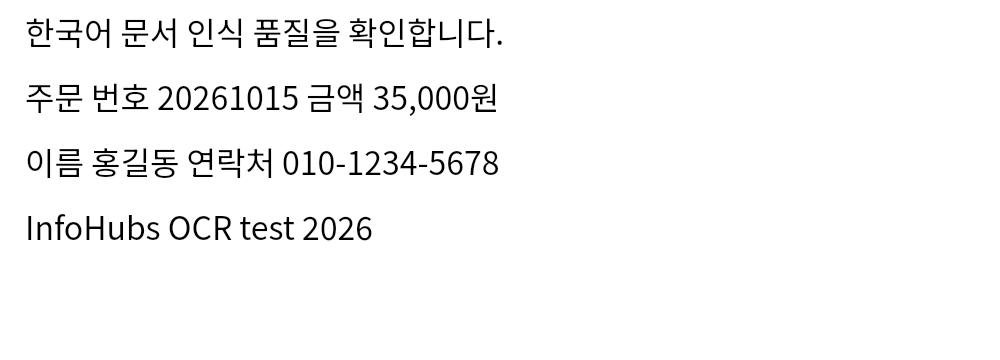
Result · Tesseract
한국어 문서 인식 품 질 을 확 인 합 니다.
주문 번호 20261015 금액 35,000 원
이름 홍길동 연락처 010-1234-5678
InfoHubs OCR test 2026
Save image · Save recognized TXT · JSON ·
When the result is not what you expected
- Text is missing or numbers are wrong
- Straighten and crop the document; check shadows and small print. Compare another engine on the same image and verify numbers, amounts and spacing against the source. Tables and handwriting are not guaranteed.
- Preparation takes too long or stops
- First use downloads an engine. Check progress and your connection, then retry with one smaller image. If it still fails, keep the source and contact us with only the error message and browser information.
Examples and limitations
Supports Korean and English images. Export scanned PDF pages as images first. Compare recognized text with the original.
Input and output
- Supported input
.jpg · .jpeg · .jfif · .png · .apng · .webp · .gif · .bmp · .tif · .tiff · .ico · .heic · .heif · .avif · .svg- Saved output
TXT · JSON
Limits and checks
- One image · 30 MB / 12 MP · 3 minutes. PaddleOCR Korean / English or the original Tesseract runs on your device. First use downloads about 66 MB for PaddleOCR or 22 MB for Tesseract from this Site. Files are never uploaded. Edit the text before saving. Handwriting, skewed documents and table reconstruction are not guaranteed.